9 Best Email Warm-Up Tools Tested: 90%+ Inbox by Day 28

TLDR: 9 email warm-up tools tested on new Gmail and Workspace domains. Best all-in-one: Instantly. Best standalone: Warmup Inbox. Best for agencies: Mailreach. Best free: TrulyInbox. The 3 that hit 90%+ inbox placement by day 28.
The best email warm-up tools send automated conversations from your inbox to build sender reputation, so your real cold emails land in the primary tab instead of spam. After testing nine tools across multiple email accounts, the ones that consistently hit 90%+ inbox placement were Instantly, Warmup Inbox, and Mailreach. But your pick depends on whether you need a standalone warm-up tool or one bundled with a cold email platform.
This guide breaks down each tool's pricing, inbox placement performance, and best use case. It also covers something most warm-up roundups skip: what to do after your domain is warm, because a 94% inbox rate means nothing if you're emailing people who don't care.
What you'll learn
- What email warm-up is and why it matters
- How we evaluated these tools
- Quick comparison table of all 9 tools
- In-depth reviews of the top email warmup tools
- Whether warmup is worth it for solo founders
- Why a warm inbox does not tell you who to write to
- How to set up email warmup step by step
- How SMTP warmup works for custom domains
- FAQ: warmup timing, free options, and common mistakes
What is email warm-up and why does it matter?
Email warm-up is the process of gradually increasing sending volume on a new or inactive email account to build sender reputation with inbox providers like Gmail and Outlook. Without it, a brand-new domain sending 200 cold emails on day one looks identical to a spammer. Warm-up tools fix that by simulating real email conversations over 21-28 days.
Here's how it works. Warm-up tools connect your email account to a network of real inboxes. They send and receive emails on your behalf, open them, reply to them, and pull messages out of spam folders. Gmail and Outlook track all of this. Over time, they learn that your domain sends mail people want to read, and your email deliverability improves accordingly.
The numbers back this up. According to FirstSales.io's analysis of 34 warm-up statistics, accounts that skip warmup see up to 90% of emails from new domains go directly to spam. Accounts that complete a full warmup cycle hit 85-90% inbox placement, keep bounce rates below 2%, and maintain spam complaint rates under 0.08% by day 21-28. The howtowarmupemail.com benchmark puts the target at 94%.
Sender reputation is the core concept. Every email service provider assigns a reputation score to your domain and IP address based on engagement signals: opens, replies, spam complaints, bounces. A new domain starts with zero reputation. Warmup builds that score before you send anything that matters. According to the same FirstSales.io data, authentication (SPF, DKIM, DMARC) alone increases inbox placement by 40-60%, and domain reputation degrades 12-15% monthly if warmup stops.
Think of it this way. You wouldn't walk into a sales meeting without doing any research on the prospect. Warmup is the research phase for your email domain. It takes a month, and skipping it tanks your deliverability for months afterward.
How we evaluated these tools
Not every email warmup tool works the same way. Some run on shared networks of real inboxes. Others use seed lists or proprietary algorithms. The differences matter for email deliverability, so here's what I looked at when evaluating these nine tools.
- Inbox placement rate was the primary metric. The benchmark from howtowarmupemail.com is 94% by day 28. Any tool that couldn't get a new Google Workspace account above 85% within four weeks got a lower score. I also tracked how quickly placement improved during the first two weeks, because some tools ramp faster than others.
- Ease of setup mattered more than you'd think. Some tools connect via OAuth in under two minutes. Others require SMTP/IMAP credentials, DNS records, or forwarding rules. For teams managing multiple email accounts, a clunky setup process multiplied by 10 domains is a real time cost.
- Pricing and free tiers got scrutinized beyond the headline number. A tool that costs $19/month but only warms one mailbox isn't cheaper than a $49/month tool that handles five. I calculated the effective cost per mailbox for each tool at typical team sizes.
- Integrations determined whether the tool fits into an existing cold email stack. If you're already using Lemlist, paying separately for warmup when Lemwarm is bundled doesn't make sense. If you run everything through Instantly, its built-in warmup saves a subscription, and if you're weighing that platform choice itself, see the Instantly alternatives compared by job.
The standard warmup duration across all tools was 21-28 days to reach stable inbox placement. Any tool claiming full warmup in under two weeks is either measuring differently or not delivering consistent results.
Best email warm-up tools compared
| Tool | Pricing | Free tier | Key feature | Best for |
|---|---|---|---|---|
| Instantly | From $37/mo (includes warmup) | No | Warmup bundled with cold email platform | All-in-one cold email + warmup |
| Warmup Inbox | From $19/mo per inbox | 7-day free trial | Dedicated warmup with 35,000+ inbox network | Standalone warmup focus |
| Mailreach | From $25/mo per inbox | No | Agency dashboard for multi-domain management | Agencies managing multiple domains |
| Lemwarm | $29/mo standalone or included with Lemlist ($79/mo+) | No | Auto-adjusts warmup based on deliverability score | Lemlist users or standalone warmup |
| Snov.io Email Warmup | Included with Snov.io ($39/mo+) | Free plan (15/day, 450/mo) | Warmup + B2B lead gen in one platform | B2B lead gen stacks |
| TrulyInbox | Free (1 account, 10/day) | Yes | Free tier for basic warmup; paid from $22/mo | Free warmup, no budget |
| Mailwarm | From $69/mo (1 inbox, 50/day) | No | High daily interaction volume (up to 500/day) | High-volume senders |
| Smartlead | From $39/mo (unlimited mailboxes) | 14-day trial | Unlimited warm-up across all plans + auto rotation | Agencies and high-volume senders |
| Maildoso | From $2.50/mailbox/mo (30+ mailboxes) | No | Cold email infrastructure with built-in warmup | Teams scaling to 10+ domains |
In-depth reviews of the top email warmup tools
1. Instantly — best all-in-one for cold email + warmup
Instantly bundles email warmup directly into its cold email platform, which is why it's become the default choice for teams that don't want to manage separate tools. The warmup runs through a network of 200,000+ real accounts, and it starts automatically when you connect a mailbox.
The warmup settings are straightforward. You set a daily warmup email limit (most users start at 20-40 per day), and Instantly's algorithm handles the ramp-up, reply simulation, and spam rescue. It also provides a deliverability dashboard that shows inbox placement percentage in real time, so you know exactly when your domain is ready for real campaigns.
Pricing starts at $37/month for the Growth plan (annual billing) or $47/month billed monthly. It includes unlimited warmup accounts and 5,000 emails per month. The Hypergrowth plan at $77.60/month (annual) or $97/month (monthly) bumps that to 25,000 uploaded contacts and 100,000 emails. Both include warmup at no extra cost.
Two things that work well: the warmup-to-campaign transition is smooth since everything lives in one platform, and the inbox placement reporting is more detailed than most standalone tools. The downsides: the warmup network quality varies (some users report slower ramp-up for Outlook accounts compared to Gmail), and the platform's learning curve is steeper if you only need warmup and nothing else.
Instantly is the right pick if you want one subscription to handle warmup, sequencing, and inbox rotation. If you already use a different cold email tool and just need warmup, you'd be paying for features you won't use.
2. Warmup Inbox: best dedicated warm-up tool
Warmup Inbox does one thing: email warmup. It skips sequencing and lead gen entirely. That focus shows in the product. The network has over 35,000 real inboxes, and the tool automatically sends, opens, replies, and marks emails as important from real accounts.
Setup takes about three minutes. You connect your email via OAuth (Google Workspace) or SMTP/IMAP credentials, set your daily volume, and pick a warmup template tone. The dashboard tracks inbox placement, spam rate, and reputation score over time with clean, readable graphs.
Plans start at $19/month per inbox on the Basic plan (75 warmup emails/day). The Pro plan at $59/month per inbox pushes that to 250/day with language-specific warmup and custom templates. A Pro Bundle at $46/month per inbox (5-inbox minimum) offers the best value for teams. All plans include a 7-day free trial.
What stands out is the reporting. Warmup Inbox shows your inbox vs. spam placement percentage daily, and it breaks down performance by provider (Gmail, Outlook, Yahoo). You can see exactly where your reputation is weak. The downside is that it's a single-purpose tool. If you're already paying for Instantly or Lemlist, which include warmup, adding Warmup Inbox is a redundant cost.
Best for teams that want dedicated, high-quality warmup and already have their cold email sending handled elsewhere.
3. Mailreach — best for agencies managing multiple domains
Mailreach built its product around agencies and consultancies that manage cold email for multiple clients. The multi-account dashboard is where it differentiates. You can see inbox placement scores across dozens of domains in one view, which saves serious time compared to logging into separate tools.
The warmup runs on a network of real inboxes, and Mailreach assigns a "spam score" and "inbox score" to each connected account. These update daily. When a domain's health drops, you get an alert before it affects live campaigns. This proactive monitoring helps improve your email deliverability before problems compound.
Pricing starts at $25/month per email account. Agency plans with 10+ accounts get bulk pricing, though you'll need to contact sales for exact numbers. No free tier exists.
The strength here is operational visibility. If you're managing warmup across 15 client domains, seeing all their health metrics in one dashboard beats checking each one individually. Mailreach also provides detailed reports you can white-label for client updates. On the other hand, for a single user with one or two mailboxes, it's more tool than you need. The interface prioritizes multi-account management, so solo users may find it busier than necessary.
Mailreach fits agencies running cold email campaigns for multiple clients who need centralized deliverability monitoring.
4. Lemwarm — best for Lemlist users (now available standalone)
Lemwarm is Lemlist's warmup feature, available both as a built-in feature for Lemlist users and as a standalone product. If you're already on Lemlist for cold email sequencing, warmup is included in your subscription with no extra charge. That bundling alone makes it the obvious pick for existing Lemlist customers.
What makes Lemwarm different from most warmup tools is its adaptive algorithm. Instead of running a fixed daily volume, Lemwarm adjusts based on your deliverability score. If your inbox placement drops, it increases warmup volume. If your reputation is strong, it pulls back. This dynamic approach means the tool adapts to how inbox providers are treating your domain in real time.
Lemwarm standalone starts at $29/month per email (Essential) or $49/month per email (Smart, with personalized warmup emails and industry-tailored networks). Bundled with Lemlist, it's included in all plans starting at $79/month for Email Pro.
The adaptive warmup genuinely works well. Users who've compared static-volume tools against Lemwarm report more stable deliverability over time, especially during periods of heavy sending. The trade-off with the standalone version is that the warmup reporting is simpler than Warmup Inbox or Mailreach, with fewer provider-level breakdowns.
Best for anyone already using Lemlist, or teams that want adaptive warmup as a standalone tool.
5. Snov.io Email Warmup for B2B lead gen stacks
Snov.io is primarily a B2B lead generation and email outreach platform. Email warmup is one feature inside a broader toolkit that includes prospect finder, email verifier, drip campaigns, and a CRM. If you already use Snov.io for prospecting, the warmup feature adds warmup to your workflow without another subscription.
The warmup works through Snov.io's network of real mailboxes. You connect your email account, choose a topic category (so warmup conversations sound natural), and set daily sending limits. Snov.io handles the rest, including spam rescue where warmup emails get pulled out of spam and moved to the inbox.
Snov.io's Trial plan includes email warmup for 1 mailbox at 15 emails per day, with a one-time quota of 450 warmup emails total. That's enough to test the feature, but not enough for a full warm-up cycle. Paid plans start at $39/month (Starter, billed monthly) or $29.25/month on annual billing, with 3 mailbox warm-ups and 50 messages per day each.
Two things I liked: having warmup inside the same platform as your lead gen pipeline reduces context switching, and the paid plans offer unlimited mailbox warm-ups at higher tiers. Two things I didn't: the free trial warmup quota runs out before a full warmup cycle completes, and the deliverability reporting isn't as detailed as Warmup Inbox or Mailreach. You get inbox vs. spam percentages, but no provider-level breakdowns.
Snov.io's warmup fits B2B teams already using the platform for lead gen. If warmup is your primary concern, standalone tools offer more depth.
6. TrulyInbox: best free warm-up option
TrulyInbox is a standalone email warm-up tool that integrates directly with Saleshandy. The free plan does not expire or require a credit card. It lets you connect one email account with warmup capped at 10 emails per day. That's enough to start building sender reputation on a single domain, though a full warm-up cycle will take closer to 5-6 weeks at that volume. The Starter plan costs $29/month, or $22/month when billed annually, and includes 200 warmup emails per day. It's the default starting point for founders who need to warm up a domain before committing to paid tools.
The warmup process follows the standard model: TrulyInbox connects your email account to a network of real inboxes, sends and receives conversations, and rescues messages from spam. You can control the daily warmup volume and ramp-up speed. The dashboard shows inbox placement rate and trends over time.
The free plan works for getting started. For more volume, the Growth plan costs $99/month, or $84/month when billed annually, and includes 1,000 warmup emails per day. It also adds ESP-level analytics, detailed reports, and advanced scheduling.
The obvious pro is the free entry point. For bootstrapped founders testing warmup on a single domain, free matters. Setup takes under five minutes with Google OAuth. The con is that 10 emails per day on the free plan means a very slow ramp. The free plan includes basic tracking. ESP-level analytics and detailed reports require the Growth plan.
Best for anyone who needs to test warmup with zero budget. Upgrade to the Starter plan or a paid tool when email deliverability becomes mission-critical.
7. Mailwarm: high-volume warm-up for aggressive senders
Mailwarm positions itself around volume. While most warmup tools max out at 40-50 warmup emails per day by default, Mailwarm lets you push up to 500 daily interactions on its Scale plan. For teams running aggressive cold email campaigns across multiple domains, that volume capacity matters. According to Warmy.io's analysis of high-volume sender warmup, scaling warmup volume without tanking deliverability requires careful ramp-up scheduling, which is exactly what Mailwarm's higher-tier plans are built for.
According to case studies on Mailwarm's website, their users see measurable improvements in inbox placement within the first two weeks of warmup. The tool works with Gmail, Outlook, SMTP, and most email providers. Setup is SMTP/IMAP-based, not OAuth, which means slightly more configuration upfront but broader email service provider support.
Pricing starts at $69/month for the Starter plan (1 inbox, 50 warmup emails/day). The Growth plan at $159/month supports up to 3 inboxes with 200 emails/day. The Scale plan at $479/month handles 10 inboxes at 500/day. No free tier.
Mailwarm's strength is raw throughput. If you're warming up multiple inboxes simultaneously and need aggressive ramp-up schedules, few tools match its capacity at the higher tiers. The reporting is clean and shows daily inbox placement trends. The drawbacks are price and setup friction. At $69/month for a single inbox, it's significantly more expensive per mailbox than Warmup Inbox or Instantly. The SMTP/IMAP-only setup also means no quick OAuth connection for Google Workspace.
Best for teams that need high warmup volume across many domains and don't mind paying a premium for it.
8. Smartlead — best for agencies and high-volume warm-up
Smartlead built its reputation on email deliverability, and unlimited warm-up across all plans is a core part of that. Whether you connect 5 mailboxes or 200, the warm-up cost doesn't change. For agencies managing cold email campaigns across dozens of client domains, that pricing model makes a real difference.
The warm-up runs on Smartlead's proprietary network. You connect mailboxes via SMTP/IMAP, and the platform handles sending, receiving, and spam rescue automatically. Smartlead also includes auto mailbox rotation, which distributes your cold email volume across connected accounts to protect individual sender reputation. The unified inbox pulls all replies into one view regardless of which mailbox sent the original email.
Pricing starts at $39/month (Basic, billed monthly) or $32/month on annual plans. The Basic plan includes 2,000 active leads, 6,000 emails per month, and unlimited mailbox connections with warm-up. The Pro plan at $94/month ($79 annual) bumps active leads to 30,000 and emails to 150,000. All plans include a 14-day free trial.
Two things that stand out: the unlimited mailbox warm-up means scaling from 5 to 50 domains doesn't increase your cost, and the SmartSenders feature provides dedicated email infrastructure rather than shared IPs. Two things to know going in: the UI prioritizes function over polish (users describe it as "cluttered"), and weekend maintenance windows can interrupt campaign scheduling. If you care about clean design, Instantly looks better. If you care about warm-up economics at scale, Smartlead wins.
Best for lead gen agencies and teams warming up 10+ mailboxes who want flat-rate pricing with no per-inbox fees.
9. Maildoso for scaling cold email infrastructure
Maildoso takes a different approach from every other tool on this list. Instead of warming up mailboxes you already own, Maildoso provides the entire cold email infrastructure: domains, mailboxes, DNS configuration, and warmup all in one package. If you're scaling from 1 domain to 10 or more, buying and configuring everything separately gets tedious fast. Maildoso eliminates that setup overhead.
The platform manages over 400,000 mailboxes and sends 10M+ emails per day across its user base. You can choose between SMTP mailboxes (cheapest) or official Google Workspace accounts, or combine both for diversified infrastructure. SPF, DKIM, and DMARC records are configured automatically when you register domains through the dashboard. Setup takes roughly 10 minutes per batch, not per mailbox.
Pricing scales by volume. Monthly SMTP plans start at $75/month for 30 mailboxes ($2.50 per mailbox). At 70 mailboxes, the per-unit cost drops to $2.25. Combo plans (SMTP + Google Workspace) start at $90/month for 30 mailboxes. Quarterly plans offer further savings: 32 mailboxes for $299/quarter with 8 free domains included. Domain registration runs $12 per domain per year.
What works well: the one-click sync with Instantly, Smartlead, Saleshandy, Apollo, and Lemlist means your warmed mailboxes connect to your sending platform without manual SMTP entry. The deliverability monitoring shows per-inbox health scores, so you can spot problems before they land in the inbox of a real prospect. What doesn't: Maildoso is infrastructure, not a sending platform. You still need a separate tool for sequences and campaigns. Some users on G2 report that deliverability can be inconsistent across SMTP mailboxes compared to native Google Workspace accounts.
Best for teams scaling to 10+ sending domains who want infrastructure and warmup handled in one place. Not the right fit if you only need to warm up one or two existing mailboxes.
Is email warmup actually worth it for solo founders?
For most solo founders on a new domain, warmup is worth it. A free tool like TrulyInbox takes five minutes to set up, runs for 3-4 weeks in the background, and can push inbox placement from baseline to 85%+. The cost is zero. The risk of skipping it is months of emails landing in spam.
Here's a common solo founder scenario. You buy a domain, set up Google Workspace, and start sending 30-40 cold emails per day. Within a week, your inbox placement drops, responses are nonexistent, and you assume cold email doesn't work. The problem isn't your copy or your offer. It's that half your emails are landing in spam before anyone reads the subject lines that get opens.
Warmup fixes that specific problem. But here's where solo founders get stuck: they fix deliverability and still get low reply rates. That's an upstream issue. If you're emailing the wrong people or emailing at the wrong time, a warm domain just means your irrelevant email arrives in the primary inbox instead of spam. Better delivery of bad targeting still produces bad results.
The short answer is that warmup is table stakes for cold email on a new domain. It costs nothing with free tools and removes a technical barrier. But don't expect it to fix a targeting or timing problem. Those require different solutions.
A warm inbox does not tell you who to write to
Warmup helps your email reach the inbox. It does not make the person care.
If you are warming inboxes for cold outreach, the harder problem is who to write to. A warm domain can improve delivery. It cannot tell you who has the problem you solve or why now is a good time to contact them.
Signado watches LinkedIn posts and comments around the problems you solve. It checks whether the person and company fit your business. It keeps what they said beside the lead. Then it marks the lead with the next move: send a message, leave a useful comment, or skip.
Signado is built for agencies, consultants, and B2B service businesses that need clients. It does not replace an email warmup tool. It also never connects to your LinkedIn account.
For the wider set of options, see our LinkedIn prospecting tools guide.
How to set up email warm-up (step by step)
Getting warmup right isn't complicated, but the sequence matters. Here's the timeline for a new email domain from purchase to live campaigns.
Warm-up timeline
| Day | Action | Target |
|---|---|---|
| 1 | Buy secondary domain, set up mailbox, configure SPF/DKIM/DMARC | DNS propagation complete |
| 1-3 | Connect warmup tool, start at 10-20 emails/day | First warmup emails sent and received |
| 4-7 | Let warmup run, don't send real emails | Baseline reputation building |
| 8-14 | Ramp to 30-50 warmup emails/day | 80-90% inbox placement |
| 15-21 | Continue ramping, monitor provider-level placement | 90%+ inbox placement |
| 22-28 | Begin sending 20-30 real emails/day alongside warmup | 94% inbox placement target |
| 28+ | Maintain warmup at 10-15/day, scale real sending gradually | Stable reputation, monitor via Postmaster Tools |
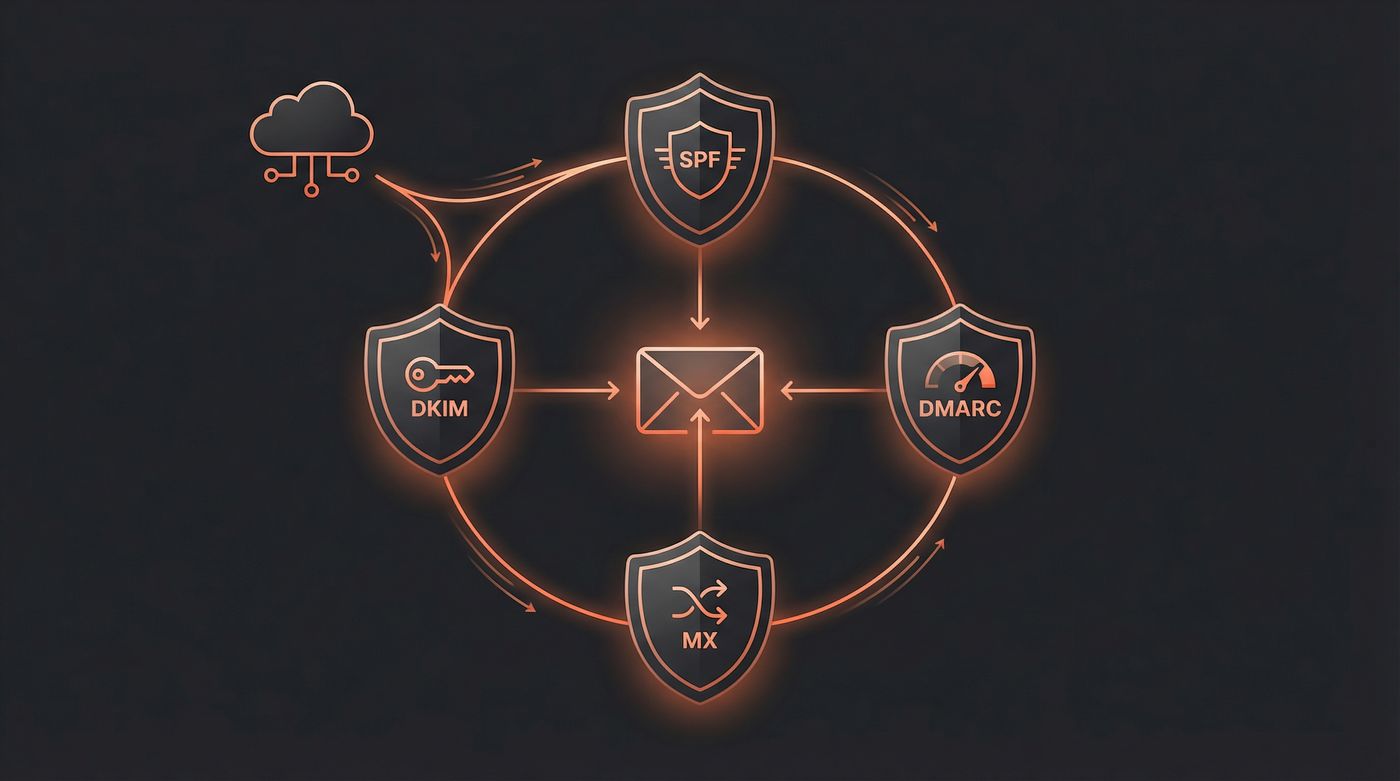
Day 1: Domain and mailbox setup. Buy a secondary domain for cold outreach. Don't use your primary company domain. Set up Google Workspace or Outlook, then configure your DNS authentication records. Without these, warmup tools can't do their job — inbox providers won't trust your domain regardless of how many warmup emails you send.
DNS records you need before starting warm-up
| Record | What it does | Without it | How to set up |
|---|---|---|---|
| MX | Points your domain to a mail server so you can receive email | Warmup replies bounce, reputation never builds | Add your email provider's MX records (Google: ASPMX.L.GOOGLE.COM) |
| SPF | Tells inbox providers which servers are allowed to send email for your domain | Emails fail authentication checks | Add a TXT record: v=spf1 include:_spf.google.com ~all |
| DKIM | Signs every outgoing email with a cryptographic key to prove it wasn't forged | Spam filters flag your messages as potentially spoofed | Generate in your email provider's admin panel, add the TXT record to DNS |
| DMARC | Tells inbox providers what to do when emails fail SPF or DKIM checks | No enforcement policy — spoofed emails using your domain go unchallenged | Add a TXT record: v=DMARC1; p=quarantine; rua=mailto:dmarc@yourdomain.com |
Start with p=none for the first two weeks of warm-up so you can monitor without blocking legitimate email. Move to p=quarantine once your warm-up tool confirms stable inbox placement. Most email service providers (Google Workspace, Outlook) handle DKIM signing automatically once you add the DNS record.
You can verify all four records are configured correctly using free tools like MXToolbox or mail-tester.com. Run a check before connecting your warm-up tool — misconfigured DNS is the #1 reason warm-up stalls at 70-80% inbox placement instead of reaching 90%+.
How SMTP warmup works for custom domains
SMTP warmup is not a separate deliverability trick. It is email warmup with more plumbing exposed.
With Google Workspace or Outlook, a lot of the sending infrastructure is already handled for you. With a custom SMTP domain, the warmup tool may only get SMTP/IMAP access. That lets it send warmup conversations, receive replies, and rescue mail from spam. It does not automatically make the domain trustworthy.
The inbox providers still look at the same boring signals: does the domain authenticate, can it receive replies, does the sending IP have a sane history, do people complain, and did volume ramp up like a real sender instead of a spam burst? Google's sender guidelines call out SPF or DKIM for all senders, DMARC for bulk senders, valid forward and reverse DNS records, and low spam rates. SendGrid's IP warmup docs say cold dedicated IPs need gradual volume increases because inbox providers use volume as a spam signal. Mailgun's warmup guide says newer domains may need a similar reputation-building period, not just new IPs.
Before you connect a custom SMTP domain, check this:
| Check | Why it matters |
|---|---|
| MX records receive mail | Warmup replies have to land somewhere. If replies bounce, the whole feedback loop breaks. |
| SPF, DKIM, and DMARC pass | Authentication tells Gmail and Outlook the sender is allowed to use that domain. |
| Reverse DNS/PTR is valid when you control the IP | A raw SMTP server with mismatched reverse DNS looks suspicious before the email body is even read. |
| Shared IP or dedicated IP is known | Shared IP reputation is affected by other senders. Dedicated IP reputation is yours, but it starts cold. |
| Volume starts low | Warmup works by building a pattern. Jumping from zero to real campaign volume ruins the pattern. |
This is why SMTP warmup often feels slower than Gmail warmup. The warmup tool can create activity, but it cannot undo a dirty IP pool, a missing DKIM selector, or a domain that was registered yesterday and immediately started sending cold pitches. If a custom SMTP setup stalls around 70-80% inbox placement, fix the infrastructure before swapping warmup tools.
Days 1-3: Connect your warm-up tool. Pick one from this article, connect via OAuth or SMTP/IMAP, and start warmup at a low volume. Most tools default to 10-20 warmup emails per day during the first week. Don't override this. The slow ramp is the point.
Week 1: Let the tool work. Resist the urge to send real emails during week one. Your domain has zero reputation. The warmup tool is building baseline trust with Gmail and Outlook. Check your warmup dashboard once to confirm emails are being sent and received. Then leave it alone.
Weeks 2-3: Ramp up warmup volume. Most tools automatically increase daily warmup volume during weeks two and three, typically reaching 30-50 warmup emails per day. Your inbox placement should be climbing toward 80-90% by the end of week two. If it's not, check your DNS records. Misconfigured SPF or DKIM is the most common culprit. According to FirstSales.io, ramping too fast (exceeding 20% daily increases) triggers spam filters 73% of the time.
Week 4+: Start sending real campaigns. Once your warmup tool shows consistent 90%+ inbox placement (the target is 94% according to howtowarmupemail.com), you can begin sending real cold emails. Start small: 20-30 real emails per day alongside ongoing warmup. Don't turn warmup off when you start real sending. Run both in parallel to maintain your email deliverability.
Ongoing: Monitor sender reputation. Set up Google Postmaster Tools for your domain. It's free and shows your domain reputation, spam rate, and authentication status directly from Google's perspective. If your reputation drops, reduce real sending volume and increase warmup temporarily.
One important detail: keep your warmup tool running even after your domain is fully warm. Sender reputation isn't permanent. If you stop warming and reduce sending volume (like over a holiday break), your reputation can decay. FirstSales.io's data shows reputation degrades 12-15% monthly without ongoing warmup activity. Most users keep warmup running at a low daily volume (10-15 emails/day) indefinitely as maintenance.
If this setup is for product or transactional email, stop here. Signado does not help with SMTP setup or sender reputation. If it is for cold outreach, the next problem is who to contact. See the LinkedIn prospecting tools guide.
FAQ
How long does email warm-up take?
Most tools reach stable inbox placement in 21-28 days, but that number hides real variation. Gmail accounts tend to warm up in 14-21 days because Google's reputation algorithms respond to engagement signals faster. Outlook domains usually take the full 28 days. Custom SMTP setups on shared IP addresses can take 4-6 weeks if the IP has a mixed sending history.
If your warmup stalls around week 3 and inbox placement plateaus at 75-80% instead of climbing to 90%+, the problem is usually upstream from the warmup tool. Check three things: first, verify your SPF, DKIM, and DMARC records are passing (use mail-tester.com or Google Postmaster Tools). Second, check whether your domain or IP is on any blocklists (MXToolbox has a free lookup). Third, look at your warmup reply rate in the tool's dashboard. If replies are low, the warmup network may be treating your emails as low priority.
Beyond inbox placement percentage, watch for consistent placement across providers. A warm-up strategy that gets 95% Gmail inbox but 60% Outlook inbox isn't done. Also check Google Postmaster's domain reputation rating directly. "Medium" isn't good enough for cold outreach. You want "High" before sending real campaigns. If you're warming a domain that was previously flagged for spam, expect 6+ weeks and consider starting with a fresh domain instead.
Can I warm up a Gmail account for free?
Yes, but you can also warm up a Gmail account manually without any tool. Send 5-10 personal emails per day to contacts who will reply — colleagues, friends, existing customers. Open and reply to newsletters you're subscribed to. Move any emails that land in your spam folder back to inbox. This mimics what warmup tools automate, and Gmail's reputation algorithm responds to these engagement signals the same way.
If you want to automate it, TrulyInbox's free plan handles one account at 10 warmup emails per day. The manual approach actually works better for the first week because your replies come from real conversations, not a warmup network. After week one, switch to a tool and let it maintain the momentum. The combination of manual warmup (week 1) + tool-assisted warmup (weeks 2-4) often produces faster results than tools alone, because Gmail weights genuine replies higher than network-generated ones.
What's the difference between email warmup and email verification?
Email warmup builds your sender reputation by simulating real email engagement over weeks. Email verification checks whether an email address is valid before you send to it. They solve different problems. Warmup prevents your emails from landing in spam and helps improve your email deliverability. Verification prevents bounces by catching invalid addresses, which also protects your sender reputation.
Use both: verify your list first to remove bad addresses, then warmup your sending domain. High bounce rates (above 2%) damage the reputation you're building with warmup.
| Email warm-up | Email verification | |
|---|---|---|
| What it does | Builds sender reputation via simulated engagement | Validates email addresses before sending |
| Prevents | Spam folder placement | Bounces and invalid sends |
| Timeline | 21-28 days | Instant (per-address check) |
| When to use | Before any cold outreach from a new domain | Before every campaign send |
| Tools | Instantly, Warmup Inbox, Mailreach, etc. | NeverBounce, ZeroBounce, Snov.io verifier |
Do I need warmup if I'm sending under 50 emails per day?
It depends on domain age. If your domain is over a year old, has existing email activity, and you're sending under 50 per day with good engagement, you can probably skip dedicated warmup. Monitor your inbox placement with Google Postmaster Tools to confirm. But if you're on a new domain, warmup matters regardless of volume. Even 20 cold emails per day from a domain with zero reputation will trigger spam filters. What matters is whether inbox providers trust your domain, not how many emails you send.
How does SMTP warmup work for custom domains?
SMTP warmup works by connecting a warmup tool to your mailbox through SMTP/IMAP, then sending and receiving low-volume conversations that look like normal mail activity. The custom-domain part is where people get burned. Unlike a standard Gmail or Outlook inbox, your SMTP setup may depend on your own mail server, shared IP pool, dedicated IP, DNS records, and reverse DNS.
So the order matters. First make sure MX, SPF, DKIM, and DMARC are correct. If you control the sending IP, check the PTR/reverse DNS setup too. Then start warmup at low volume and ramp slowly. A warmup network can help build sender reputation, but it cannot rescue a broken mail stack.
Best email warm-up and sender tool?
The answer depends on where you are in the scaling curve. If you're running 1-2 domains and want everything in one platform, Instantly at $37/month (annual) handles warmup and sending without juggling subscriptions. Lemlist with Lemwarm at $79/month is a close second if you prefer its sequencing interface and adaptive warmup algorithm.
If you're scaling from 1 to 10 domains, pair a free warmup tool like TrulyInbox with a dedicated sending platform for the first few months. Once you're consistently booking meetings and the ROI justifies it, switch to a paid warmup tool. The signal that your free tool's quality is degrading: inbox placement drops below 85% on your warmup dashboard, or Google Postmaster Tools shows your domain reputation sliding from "High" to "Medium." That's when the larger warmup networks of paid tools (Warmup Inbox's 35,000+ inboxes, Instantly's 200,000+) make a measurable difference. If you're past 10 domains, look at Maildoso for infrastructure bundled with warmup, or Mailreach for agency-level dashboard visibility.
Warmup solves delivery. Pick the tool that fits your mailbox, set it up, and give it time. If you only need better inbox placement, stop there.
If the mailbox is for cold outreach, the next problem is who to write to.
Your inbox is warm. Now find someone worth writing to
Signado watches LinkedIn posts and comments, checks whether the person and company fit your business, and shows you what they said. Each lead comes with a clear next move. Signado never connects to your LinkedIn account.
Built for agencies, consultants, and B2B service businesses. Signado is not an email warmup or SMTP tool.