Best LinkedIn Prospecting Tools and Automation for 2026

TLDR: Choose the tool for the part that is slow. Use Sales Navigator for search, Apollo or Kaspr for contacts, Clay for enrichment, Signado or Trigify for live conversations, PhantomBuster for custom extraction, HeyReach or Expandi for sending, and Kondo for replies.
The best LinkedIn prospecting tool depends on what is slowing you down. Search, contact data, enrichment, recent conversations, LinkedIn outreach, and reply management are different problems. One product rarely handles all of them well.
Buying a large stack too early makes the problem harder to see. Start with the missing output. If you can find the right people but lack email addresses, add contact data. If you have a list but no reason to contact anyone now, find recent conversations. If good replies are getting lost, fix the inbox.
This guide compares the tools that fit those steps. It tells you what each one does, what it costs, when to choose it, and where it stops.
Quick comparison of the best LinkedIn prospecting tools
Prices below were checked on vendor sites on September 16, 2026. Annual billing prices are marked because the monthly charge may be higher.
| What you need | Tool | Listed price | Main limit |
|---|---|---|---|
| LinkedIn account and lead search | LinkedIn Sales Navigator | Free trial; plan price shown in LinkedIn's purchase flow | Search does not provide a finished, checked outreach list |
| Contact database and email outreach | Apollo | Free; Basic from $49 per seat monthly on annual billing | A contact match does not show current interest |
| Emails and phone numbers from LinkedIn | Kaspr | Free; Starter from $49 monthly on annual billing | Credits, coverage, and export limits vary |
| Sales Navigator list export | Evaboot | From $9 monthly for 100 credits | Requires Sales Navigator and inherits the search quality |
| Custom enrichment and data work | Clay | Free; Launch listed from $185 monthly | Takes time and skill to build and maintain |
| Checked leads from LinkedIn conversations | Signado | From $29 monthly for 1,000 credits | Focused on LinkedIn and does not automate LinkedIn actions |
| Social activity across several sites | Trigify | From $40 monthly; 14-day trial | Broader setup than a focused LinkedIn feed |
| Custom LinkedIn data extraction | PhantomBuster | From $56 monthly on annual billing | You must build the checks and handoffs around the output |
| Automated LinkedIn outreach | HeyReach or Expandi | From $79 or $99 monthly | Connects to a LinkedIn account and automates actions |
| LinkedIn inbox management | Kondo | From $28 per user monthly on annual billing | Organizes replies but does not find new people |
How is a LinkedIn prospecting tool different from automation?
A LinkedIn prospecting tool helps with research or contact selection. A LinkedIn automation tool takes repeated actions, often through your account. Some products do both. That difference matters because search and enrichment carry different account risk from software that sends LinkedIn messages, visits profiles, or runs sequences.
A LinkedIn prospecting tool helps you find, check, contact, or manage a possible client connected to LinkedIn. The useful output might be a saved lead, a work email, an enriched company record, a recent comment, a sent message, or a reply that needs follow-up.
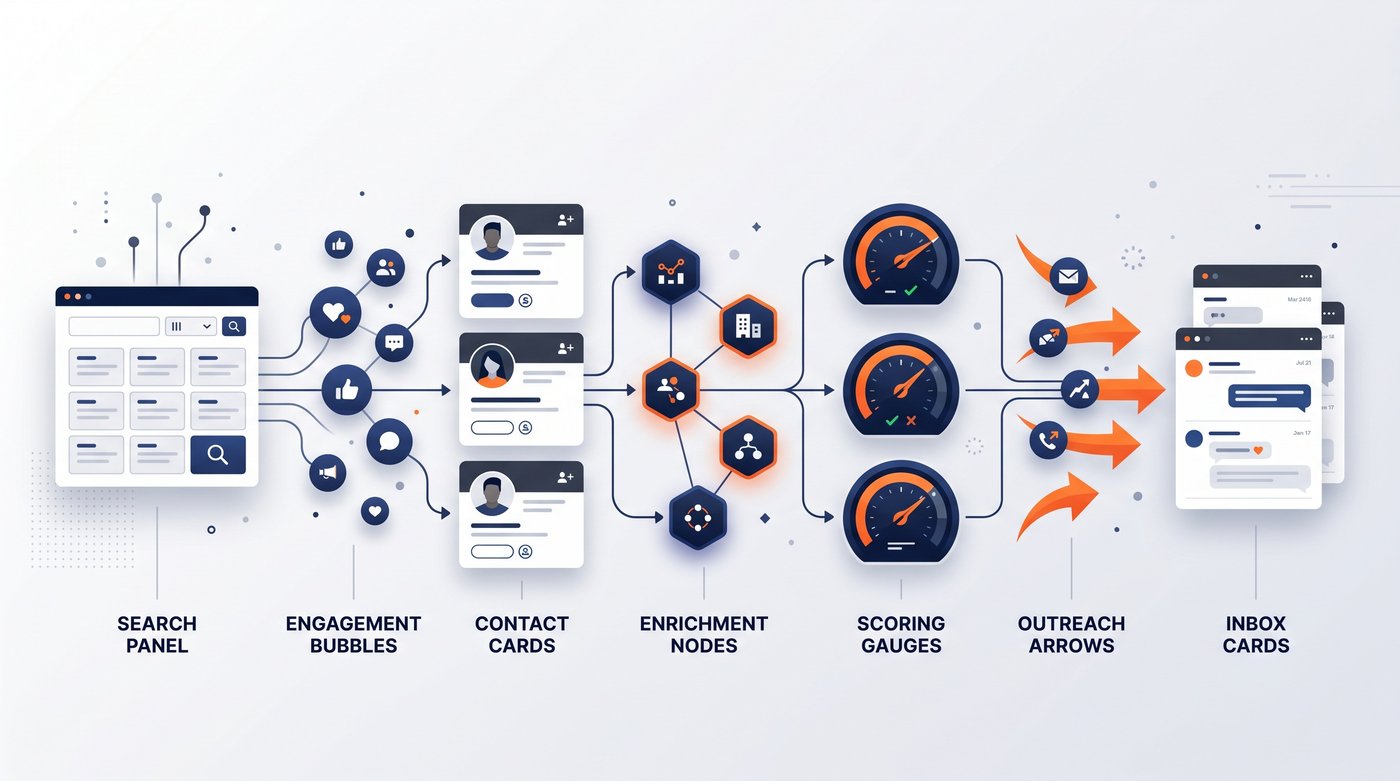
That wide definition explains why tool lists often feel confused. Sales Navigator searches LinkedIn. Apollo provides contact records. Clay builds data workflows. Signado finds and checks people from posts and comments. HeyReach sends automated LinkedIn messages. Kondo organizes the inbox.
The order is more useful than the category name. Good LinkedIn lead generation tools should fit one clear step:
- Find people from a clear source.
- Check the person and company.
- Get the contact details you need.
- Keep the reason they were selected.
- Choose a useful comment, direct message, email, or skip.
- Track the reply and next step.
Do not buy a sending tool when the source is wrong. Faster cold outreach to weak prospects only creates more ignored messages.
How we chose these tools
This shortlist is built for agency founders, consultants, and service businesses finding clients for their own work. A LinkedIn sales prospecting tool had to solve a clear part of that process and show enough current product or pricing information to make a fair choice.
We checked four things for each option:
- The output you receive after using it
- The real workflow needed to reach that output
- The listed price or trial terms
- The point where another tool or manual work is still needed
The list is ordered by the usual flow from finding people to managing replies. It is not a ranking from best company to worst company. The right choice depends on the part you need to fix.
Which LinkedIn prospecting tools fit each step?
Start with the missing output, then test the smallest tool that can produce it. Search tools find possible people. Contact tools add email or phone data. Enrichment tools fill gaps. Conversation tools provide current context. Sending and inbox tools act only after the lead is worth contacting.
1. LinkedIn Sales Navigator for account and lead search
LinkedIn Sales Navigator is the clearest starting point when you need to map a B2B sales market inside LinkedIn. LinkedIn lists more than 50 search filters, saved leads and accounts, alerts, custom lists, 50 monthly InMail credits, and up to 10,000 saved leads on its plans.
Use it to build a target account list, find the people closest to a problem, save searches, and watch for role or company changes. The Sales Navigator lead generation guide shows how using LinkedIn Sales Navigator works from the first filter to the final review.
Choose Sales Navigator when standard LinkedIn search cannot isolate your market or when saved alerts would change who you review each week. Check whether your searches return the right companies and roles before adding another product.
The limit is the output. A search result is a possible client, not a qualified lead. Sales Navigator does not give you a verified email export, score every person against your offer, or decide whether a recent post deserves a comment or message.
2. Apollo for contact data and email-ready lists
Apollo combines contact and company data with filters, enrichment, email sequences, extensions, and CRM connections. Its free plan includes 900 yearly credits. Basic starts at $49 per seat each month on annual billing, while Professional starts at $79.
Choose Apollo when you already know the roles and companies you need, but you still need work emails, phone numbers, or an email sequence. A simple test is to upload or search for 25 known prospects and check email coverage, accuracy, and credit use before moving a larger list into an email outreach campaign.
Apollo is broad enough to replace several small contact tools. It is also easy to mistake database coverage for interest. The record may be accurate while the person has no current reason to care about your service.
Use the Signado and Apollo comparison when the choice is between searching a large contact database and finding named people already talking about a relevant problem.
3. Kaspr for contact details while browsing LinkedIn
Kaspr fits a profile-first workflow. Its Chrome extension can reveal work emails and phone numbers from a LinkedIn profile, search, group, event, or Sales Navigator result. It can also enrich a CSV of LinkedIn URLs and send records to other tools.
The free plan includes small email and phone allowances. Starter is listed at $49 monthly on annual billing or $65 on monthly billing. It includes unlimited B2B email credits, 100 monthly phone credits on the monthly allowance, and an annual export cap.
Choose Kaspr when you already find the right people by hand and want their contact details without building a data table. Test it on the countries and roles you sell to. Coverage that works for one market may be weak in another.
The limit is list discipline. Kaspr makes contact capture fast, but it does not tell you whether the company fits, whether the person is close to the problem, or why this week is a good time to write.
4. Evaboot for Sales Navigator exports
Evaboot turns a Sales Navigator search into a cleaned export. It can export leads or accounts, filter the results, find work emails, verify them, and pass the data to a CRM or webhook.
The smallest listed plan is $9 monthly for 100 credits, or $90 when billed yearly. One exported lead costs one credit. Finding and verifying its email costs one more. You are not charged for an email it cannot find.
Choose Evaboot when Sales Navigator is already your main source and copying records is the slow part. It turns a LinkedIn lead generation search into a file you can check and use elsewhere. Export one narrow search first. Check the rejected rows, missing emails, and people who do not match the original filters.
Evaboot requires an active Sales Navigator subscription. It also cannot rescue a weak source search. If the search contains the wrong people, a clean export is still the wrong list.
5. Clay for enrichment, research, and custom scoring
Clay is for people who want to build their own data process. It can combine data from more than 150 providers, run waterfall enrichment, research people and companies with Claygent, track job and company changes, score records, and send the result into other systems.
Clay has a free plan. Its pricing FAQ lists Launch from $185 monthly with 2,500 data credits and 15,000 actions per month. Higher plans add CRM sync, HTTP connections, webhooks, and more signal sources.
Choose Clay when your lead record needs several custom checks before it becomes useful. Build one table with 50 rows and measure how many finish with the fields you need, what each finished row costs, and how often a step fails. Use that extra research to personalize outreach only when it changes what you would say.
The limit is ownership. Someone must design the table, choose providers, watch credit use, repair broken steps, and decide what happens when data is missing. The Signado and Clay comparison explains the difference between building that system and using a narrower lead workflow.
6. Signado and Trigify for recent conversations and activity
These tools start from current LinkedIn activity instead of another static directory. They fit the part between finding a market and deciding who deserves a message.
Signado watches LinkedIn posts and comments around keywords, creators, competitors, and selected posts. It checks the person and company against the user's client profile, keeps what they said, and gives each lead a next move such as direct message, useful comment, research, or skip. The original words stay attached, so the user can see why the person appeared and write from something the person will recognize. Signado never connects to the user's LinkedIn account.
Plans run from $29 to $349 monthly. Lite includes 1,000 credits, and one new lead that is discovered, enriched, checked, and scored costs five credits. Choose Signado when you want a smaller feed of checked LinkedIn leads with the original conversation and next move attached. The limit is breadth. It focuses on LinkedIn discovery and does not send automated visits, invites, likes, or messages.
Trigify watches activity across more than 11 social sites. Its site lists competitor engagement, role changes, hiring, tracked topics, person and company enrichment, workflows, API access, MCP, and a command line tool. Starter costs $40 monthly, Max costs $199, and every plan starts with a 14-day trial without a card.
Choose Trigify when you need a broader activity layer across several sites or want to build agents and workflows around the data. Choose Signado when the main task is finding and acting on useful LinkedIn conversations without connecting your account. The Signado and Trigify comparison goes deeper on that choice.
7. PhantomBuster for custom extraction and repeated workflows
PhantomBuster provides more than 100 automations and ready-made LinkedIn workflows. You can extract search results, collect people who engaged with a post, enrich profiles, send data to another tool, and run the same process on a schedule.
Paid plans start at $56 monthly on annual billing. That tier lists 20 hours of monthly execution time, five automation slots, 500 monthly email credits, and unlimited exports. Higher plans add more time, credits, and parallel runs.
Choose PhantomBuster when you can name the exact rows you want and know how the next steps will work. Run a small export, then inspect duplicate people, missing company data, irrelevant roles, and the manual checks still required before contact.
The output is raw material for a process you own. It does not become a checked prospecting feed on its own. It also runs LinkedIn workflows through connected accounts, so account access and automated actions belong in the buying decision. The Signado and PhantomBuster comparison covers that structural difference.
8. HeyReach and Expandi for automated LinkedIn outreach
HeyReach and Expandi are cloud-based LinkedIn automation platforms that act after the list is ready. They connect to LinkedIn accounts and automate actions such as connection requests, messages, follow-ups, and campaign steps.
HeyReach starts at $79 monthly per LinkedIn sender. Its page lists unlimited outreach campaigns, LinkedIn actions, a shared inbox, multichannel outreach, enrichment credits, API and webhooks, workspaces, and permissions. Larger plans are aimed at agencies managing multiple LinkedIn accounts.
Expandi lists a $99 monthly Business plan and a seven-day trial. It includes campaign types, action limits, scheduling, LinkedIn sequences, email follow-ups, message and image options, analytics, blacklist controls, and a separate agency offer for larger setups.
Choose either product only when the source, exclusions, and message process already work by hand. The right LinkedIn outreach tool should repeat a sound process, not hide a weak one. Test with a small list and watch acceptance, useful replies, complaints, and account warnings.
The limit is account risk. Both products connect to a LinkedIn account and take actions on it. Their controls may reduce reckless outreach automation, but they do not change LinkedIn's rule on third-party automation.
9. Kondo for managing LinkedIn replies
Kondo is an inbox tool, not a lead source. It adds labels, reminders, snippets, voice notes, and faster inbox actions. Its Business plan adds Sales Navigator Inbox support, CRM connections, analytics, and MCP.
Basic starts at $28 per user each month on annual billing. Business starts at $36. Choose Kondo when useful conversations already exist but follow-ups get buried in LinkedIn's inbox.
Test it with the people who currently handle replies. Check whether they can find an open conversation, schedule the next action, and move the result into the system you already use.
Kondo will not improve a weak prospect list or create a reason to contact someone. It belongs at the end of the process, after sourcing and outreach already produce replies worth managing.
How should you test a LinkedIn prospecting tool?
A prospecting tool should prove one useful output on a small set before it becomes part of your weekly work. Test research and contact quality first. If the product takes actions through your LinkedIn account, test the controls and stop process before increasing any volume.
Use this short test:
- Pick one source and 25 people you can review yourself.
- Define a valid person, company, contact detail, and reason to reach out.
- Run the tool once and keep every missing or wrong result visible.
- Record credits used, time saved, useful context, and any LinkedIn account action.
- Contact only the people who still pass your manual check.
This makes different LinkedIn sales prospecting tools easier to compare. A contact database should improve usable contact coverage. A lead generation tool should improve fit or timing. A LinkedIn automation platform should repeat approved actions while making limits and failures easy to see.
The best LinkedIn automation tools do not hide how they work. They show the connected account, active outreach campaign, daily limits, queued actions, and a clear pause control. The right LinkedIn automation tool also shows what failed and why. Browser-based tools and cloud-based tools may run differently, but both still need a clear account-risk answer.
Are LinkedIn automation tools safe?
Any tool that connects to your LinkedIn account and takes actions creates account risk. Research, contact data, and off-platform qualification are different from software that visits profiles, sends invites, writes messages, or runs through a browser extension. Ask what connects before asking how fast it works.
LinkedIn's prohibited software guidance says it does not permit third-party crawlers, bots, browser plug-ins, or extensions that extract data or automate activity on LinkedIn. It also says members using those tools risk account restriction or shutdown.
That rule gives you a simple check:
- Does the tool ask for your LinkedIn login, cookie, extension, or an active session?
- Does it take actions from your account or only prepare information for you?
- Can you inspect and approve each message before anything is sent?
- Can you pause every action at once?
- What happens to your data if the account is restricted?
No vendor can promise that connected automation is risk-free. Signado avoids that risk by never connecting to your LinkedIn account. Sales Navigator is LinkedIn's own search product. Contact databases and enrichment tools may carry other data and compliance questions, but they are not all taking actions through your profile.
How do you choose the right LinkedIn automation and prospecting tools?
Pick one source, one check, and one way to act. Add a separate tool only when you can name the missing output and measure whether the new step fixes it. A smaller stack is easier to test, cheaper to run, and less likely to hide a bad source.
| Your current problem | Start with | Add only when needed |
|---|---|---|
| Standard LinkedIn search is too broad | Sales Navigator | Apollo, Kaspr, or Evaboot when contact data or export becomes the block |
| You have names but no work emails | Apollo or Kaspr | Clay when several custom checks are needed |
| You have a broad Sales Navigator list | Evaboot | Clay for custom enrichment or a manual fit review |
| You need people already discussing relevant problems | Signado or Trigify | An email finder or existing sending tool after the lead passes review |
| You need a custom LinkedIn dataset | PhantomBuster | A qualification step before any outreach |
| Manual LinkedIn messages are repeatable and slow | HeyReach or Expandi | Kondo when replies become hard to track |
| Good replies are getting lost | Kondo | Fix sourcing upstream if few conversations are useful |
Run the smallest version for two weeks. Record where each person came from, whether the company and role fit, whether the contact data worked, which action you chose, and whether the reply moved the problem forward. Keep the source that produces useful conversations. Cut the tool that only produces more rows.
Common questions
What are the best AI tools for LinkedIn prospecting?
Clay fits custom AI research and enrichment. Signado checks LinkedIn conversations against your client profile and suggests the next move. Trigify fits broader social activity and agent workflows. AI should help with research and sorting, while a person checks the evidence and decides what to send.
What is the best LinkedIn prospecting tool?
The best tool is the one that fixes your current bottleneck. If you cannot name the missing output, do not buy another tool. Test one source with a small set of leads, then check fit, usable contact data, relevant context, replies, and booked calls.
Which LinkedIn prospecting tools find leads from comments?
PhantomBuster can extract people from post engagement for a workflow you build. Signado watches posts and comments around chosen keywords, creators, competitors, and posts, then checks the person and company and gives each lead a suggested next move.
How can I check whether a LinkedIn automation tool is safe?
Ask whether it needs your LinkedIn login, cookie, browser extension, or an active session. Then ask which actions it takes, how limits work, and how fast everything can be stopped. A safety claim is not the same as having no account connection.
Do I need Sales Navigator for LinkedIn prospecting?
No. Standard LinkedIn search, your network, posts, and comments are enough to test a narrow prospecting method. Sales Navigator becomes useful when you need deeper filters, saved lead and account searches, alerts, lists, or InMail.
Can I use LinkedIn prospecting tools for free?
Yes. Apollo, Kaspr, and Clay have free plans, while several other tools offer trials. Use the free allowance to test one real source and inspect the output. Regular exports, contact data, enrichment, or automated sending usually require a paid plan or credits.
Fix one part of your prospecting process first
Choose the step that failed this week. If you could not find the right people, fix the source. If the people were right but the timing was weak, add recent context. If replies were useful but hard to track, fix the inbox.
If the missing part is finding and checking people already talking about the problems you solve, see how Signado finds warm leads from LinkedIn. Start with one source and judge it by the useful conversations it creates.
Articles in this topic
Choose LinkedIn prospecting tools
Compare search, research, and automation tools by the job you need done and the account access they require.
7 Best LinkedIn Sales Navigator Alternatives for 2026
Compare 7 LinkedIn Sales Navigator alternatives by what you need: contact data, enrichment, automation, or warm leads. Current 2026 pricing.
Read article13 Best Social Selling Tools for B2B Sales (2026)
Compare social selling tools for LinkedIn prospecting, content, listening, outreach, enrichment, and warm-lead discovery from engagement.
Read articleLinkedIn Social Listening Tools for Agencies and Consultants
Compare LinkedIn social listening tools for finding named people in relevant posts and comments, with current pricing, best uses, and limits.
Read article9 B2B lead generation tools for finding clients on LinkedIn
Compare nine B2B lead generation tools by the problem they fix, the result to test, and the smallest useful stack for finding clients on LinkedIn.
Read articleBest LinkedIn Scraping Tools for Profiles, Posts, and Leads
Compare LinkedIn scraping tools for profiles, Sales Navigator, APIs, and post engagement. See how Signado turns commenters and reactors into leads.
Read articleLinkedIn Post Scraper: How to Scrape LinkedIn Posts for Leads
Use a LinkedIn post scraper to scrape LinkedIn posts, extract commenters and reactors, compare account risk, and turn engagement into enriched leads.
Read articleHow to Scrape LinkedIn Comments for Leads
Use a LinkedIn comment scraper to extract commenter profile URLs, comment text, and CSV rows from posts, then filter for actual lead intent.
Read article8 Best Apollo.io Alternatives for 2026
Compare eight Apollo.io alternatives by the problem they fix, the result to test, pricing, and when keeping Apollo is the better choice.
Read article8 Best Clay Alternatives for Data Enrichment in 2026
Seeking the best Clay alternative for data enrichment in 2026? Discover 8 top AI platforms like Clay, to power your growth.
Read article7 Best Dripify Alternatives for LinkedIn Automation in 2026
Explore 7 top Dripify alternatives for LinkedIn and email outreach in 2026. Discover smarter tools for lead generation beyond your current provider.
Read article7 Best HeyReach Alternatives for LinkedIn Outreach
Compare 7 HeyReach alternatives for solo outreach, agency accounts, multichannel campaigns, lower costs, and fixing LinkedIn reply rates.
Read article6 Best Instantly Alternatives in 2026
Discover the 6 best instantly.ai alternatives for 2026. Compare cold email & LinkedIn tools by deliverability, AI, pricing, and multichannel outreach.
Read article6 Best Lemlist Alternatives for Cold Outreach in 2026
Discover the 6 best outreach alternatives to Lemlist for 2026. Compare pricing, deliverability, AI, and multichannel features for better outreach.
Read article7 best PhantomBuster alternatives by what you need
Compare 7 PhantomBuster alternatives for LinkedIn outreach, data extraction, Sales Navigator export, enrichment, and finding prospects with a reason to reply.
Read article7 best Trigify alternatives after the 2026 shutdown
Compare Trigify alternatives with current pricing for LinkedIn engagement, enrichment, and outreach after the 2026 shutdown.
Read articleLand your next client with something relevant to say
Signado finds the people already talking about what you do on LinkedIn, and shows you what they actually said. You reach out with a reason they'll recognize.